Project Workflow Grid
See every language, step, and vendor at a glance. Advance steps, upload files, and track progress — all from one grid.
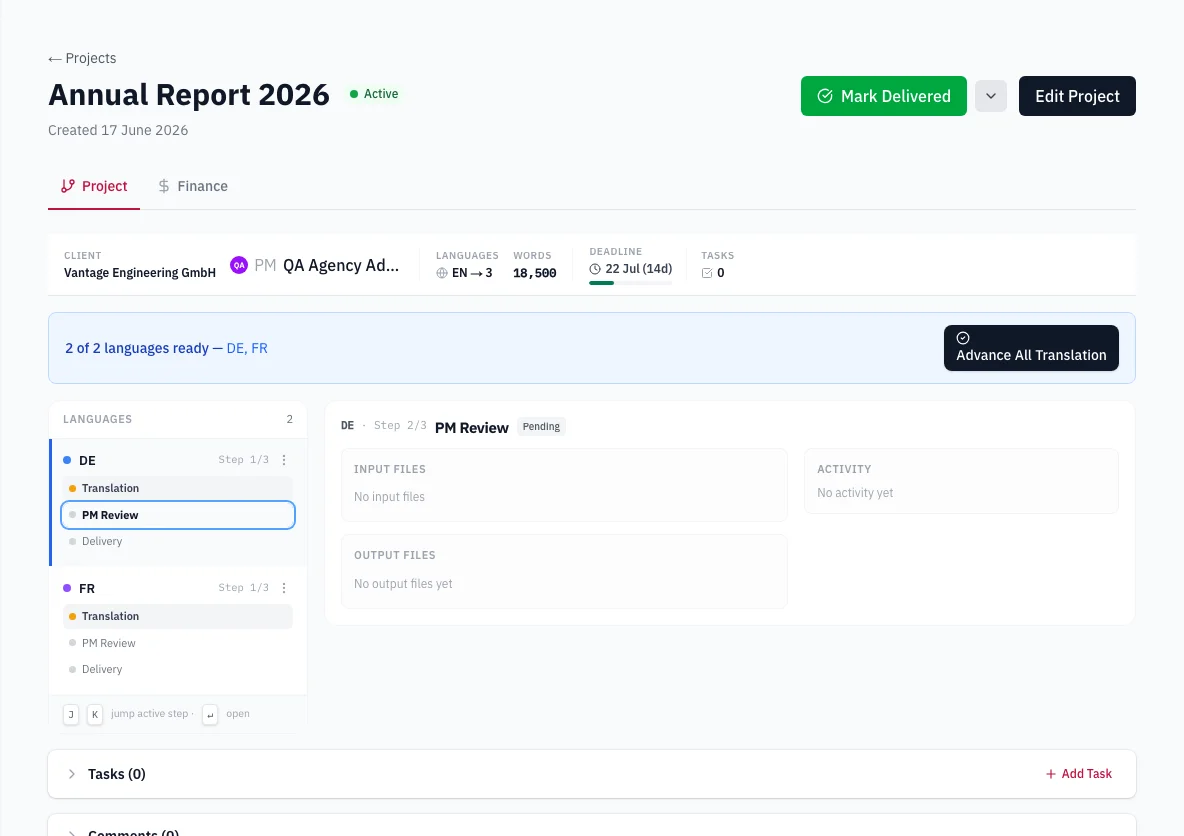
Multi-Language Grid
Every language pair gets its own row, every workflow step gets a column. Spot bottlenecks instantly without drilling into individual tasks.
One-Click Advancement
Move steps forward with a single click. PM review, translation, and delivery stages advance with built-in validation checks.
Vendor Assignment
Assign translators, reviewers, and DTP specialists to steps directly from the grid. See who is working on what at all times.
File Promotion
Output files from one step automatically become inputs for the next. No manual file shuffling between translation, review, and delivery.
See the whole multilingual project at once
A project with six languages and several stages gets messy surprisingly quickly.
One language is in translation. Two are waiting for review. Another is already through DTP. Someone asks where the Polish file is and suddenly you're opening a collection of tasks trying to piece the project together.
VectorLingo puts the project into one grid.
Languages run down the rows. Workflow stages run across the columns. You can see where each language currently sits without opening them one by one.
That makes the grid useful both when you’re setting the project up and when you’re trying to answer the everyday PM question: “Where are we with this?”
Files follow the workflow
Moving work between stages shouldn't mean manually recreating the hand-off every time.
When one stage is completed, its output files become the inputs for the next stage. Translation can feed review, review can feed the following step, and the workflow keeps track of where those files belong.
There are validation checks when a step moves forward too, so required conditions have to be met before it progresses.
You still decide when the work is ready. The software isn't trying to project-manage the job instead of you.
It's mainly about removing some of the file shuffling and keeping the hand-off attached to the workflow rather than scattered through email threads and folders.
Assign people directly to the work
Vendor assignments sit on the workflow itself.
That means you can see the person responsible for a particular language and stage in the same place you're looking at its status.
On a multilingual project, each language can move independently. They don't all need to have the same vendor, and they don't all need to reach review at the same time.
The grid gives you one project-level view while keeping those individual assignments separate.
Instead of maintaining a workflow in one place and a separate mental picture of who is doing what, the two are shown together.
Keep your CAT tool doing the CAT work
VectorLingo isn't trying to become another CAT tool.
If you work in Phrase or Trados, that's still where the CAT-side production happens. VectorLingo sits around it: quoting the work, setting up the project, assigning vendors, managing workflow stages and handling the commercial side.
If you want one system that also provides the editor your translators work in, VectorLingo isn't that product.
It’s designed for agencies that want to keep a dedicated CAT environment while connecting it more closely to the rest of the business workflow.
Frequently asked questions
How does the workflow handle multiple languages?
Each language pair has its own row and the workflow stages run across the columns, so you can see the whole multilingual project on one grid.
Do files move between steps?
Yes. The output from one completed step can become the input for the next, keeping the file hand-off inside the workflow.
Can I assign vendors from the workflow?
Yes. Vendors are assigned to individual workflow stages.
Is there validation before a step moves forward?
Yes. VectorLingo runs checks before advancing a stage so its requirements need to be satisfied first.
Does VectorLingo replace Phrase or Trados?
No. Your CAT tool remains the CAT environment. VectorLingo manages the business workflow around it.
Ready to try Project Workflow Grid?
Start your free trial today. No credit card required.
Start Agency trial→